How to Renew or Update UDID Card
After receiving your UDID Card, it’s important to verify its details. Sometimes, you may need to renew or update the card due to changes in disability category, loss of the card, or other reasons. This guide provides step-by-step instructions to renew or update your UDID Card using a mobile device or computer on udidcard.in.
Keeping your UDID Card information accurate ensures that you continue to receive government benefits, services, and official recognition of your disability status without interruption. If any information on the card changes or the card gets damaged or lost, updating or renewing it through the official portal is a simple process. In this article, we will explain the complete process in an easy and clear way so that anyone can follow it without confusion.
Requirements to Renew/Update UDID Card
Enrollment Number: The number provided during your UDID application, essential for tracking and updating your status online.
Registered Mobile Number: Used for OTP verification during the renewal or update process.
Track Your Application: swavlambancard.gov.in/login
How to Renew/Update UDID Card via Mobile Step By Step
Renew or update your UDID Card using the UDID app on Android. Follow these steps:-
Step 1 :- Download and install the UDID app from Google Play Store.
Step 2:- Select “PwD Login” from the app’s main menu.

Step 3:- Enter your Enrollment Number and Date of Birth, then click “Login.”

Step 4:- Navigate to “My Account” to view a set of options. Select the appropriate option to update details for example, name, Aadhaar number, date of birth, mobile number, email or apply for renewal in case of a lost card or non-delivery.
This interface allows you to update your details or apply for renewal easily from your mobile device.
Renew/Update UDID Card via Computer
Renew or update your UDID Card using a desktop or laptop with these steps:-
Step 1:- Open a browser and visit swavlambancard.gov.in. Click “PwD Login” in the menu bar.

Step 2:- Enter your Enrollment Number, Date of Birth, and the captcha code, then click “Submit”
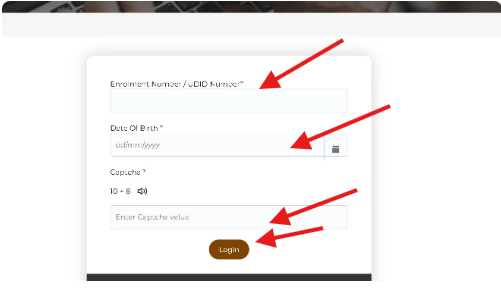
Step 3:- A new window displays your details For example., Enrollment Number, name on the right and a menu on the left to update details or renew the card. Select the appropriate option to make changes.

This process allows you to renew or update your UDID Card details efficiently.
Conclusion
Keeping your UDID Card updated is essential to ensure that your disability records remain accurate and valid in the national database. Whether you need to renew the card, update personal or disability details, or apply for a duplicate card due to loss or damage, the process can be completed easily through the udidcard.in portal using a mobile phone or computer.
By following the steps explained in this guide, you can update or renew your UDID Card without any confusion. Always make sure that the information you provide is correct and that all required documents are uploaded properly. This will help avoid delays and ensure that you continue receiving the benefits and services linked to your UDID Card without any interruption.